
AI replies & credits

How AI replies work, which automations use them, and how AI conversations are counted.

With AI replies on, Komently reads the person's actual message, applies your brand guidance, and writes a natural, on-brand response in real time — instead of repeating the same template. If AI is ever unavailable, your saved templates take over automatically, so a lead never goes unanswered.

How AI replies work

  • AI replies are available on DM auto-reply automations. (Comment replies always use your saved templates.)
  • You give one short instruction describing your business, tone, and offer.
  • For each lead, Komently generates a unique reply that fits the conversation.
  • It reveals details gradually and hands off to you when a real person is needed (e.g. someone ready to pay).

Turn it on
  1. 1

    Open an automation

    Edit an existing automation or create a new one.
  2. 2

    Enable AI replies

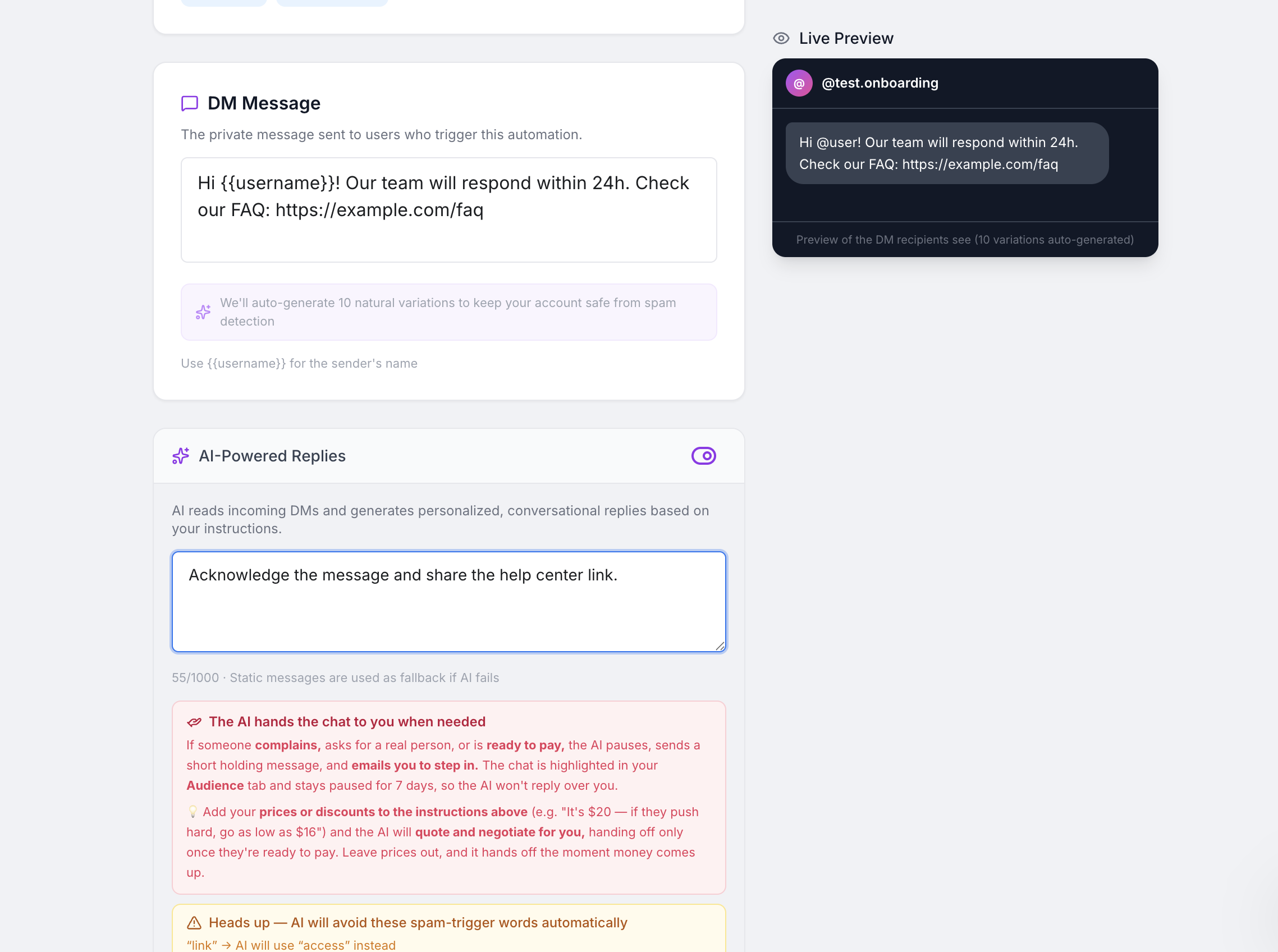
    Switch on AI replies and write your instruction — think of it as briefing a new team member: what you sell, your tone, and what to mention.
  3. 3

    Save and test

    Trigger it from another account and watch the AI reply arrive.
AI reply instruction field inside the automation builder
One short instruction controls tone and what the AI mentions.

Usage & credits

One credit = one person, on one automation. The first time the AI replies to that person counts once; every follow-up in that same conversation is included free — no matter how many messages are exchanged. Even if the chat goes quiet and the person comes back later the same month, they're still covered by that one credit. If the same person triggers a different automation, that starts a separate conversation — and if they return in a new month, that counts as a new one. Full details in AI conversation top-ups.

Sending DMs is always unlimited — only AI conversations use credits

Your Comment-to-DM automations (the message someone gets after commenting) never use a credit, no matter how many go out. A credit is used only when the AI takes over a conversation — for example, when someone replies with your AI trigger keyword. Even after your credits run out, your automated DMs keep sending exactly as before.

Your plan shows your allotment: Pro includes a set number of AI conversations each month. Lifetime and AppSumo plans include a one-time grant that never expires — once it's used, you can either buy an add-on pack (also one-time) or connect your own AI key (see below). Some plans are unlimited under our fair-use policy.

If you run out, your saved template replies take over automatically — leads still get answered — until you top up, connect your own AI key, or (on monthly plans) your allotment resets.

What “fair use” means

On plans described as unlimited, that allowance comes with a fair-use policy that exists only to stop abuse (spam, bots, sending far above Instagram's own rate limits). Genuine creators and businesses never hit it. Read the full Fair Use Policy.

Use your own AI key (BYOK)

You can run Komently's AI on your own key instead of Komently's credits. While a key is connected, AI runs unlimited and uses zero credits — the provider bills you directly for your own usage. Two providers are supported:

  • Google AI (Gemini) — the default. Get a free key at Google AI Studio (starts with AIza…).
  • OpenRouter — one key for many models (Gemini, Claude, GPT, and more) with simple prepaid credits. Get a key at openrouter.ai (starts with sk-or-…), then pick which model Komently should use from the supported list — we recommend the default, Gemini 3.5 Flash.
  1. 1

    Get a key

    Create a Gemini key at Google AI Studio, or an OpenRouter key at openrouter.ai (add a few dollars of credits there — Komently's requests are tiny).
  2. 2

    Open Settings

    Go to Settings and find the “Your own AI key” section on your plan card. Choose your provider — and for OpenRouter, the model.
  3. 3

    Paste and connect

    Paste your key and click Connect. We verify it with a live test call, so a typo or an empty OpenRouter balance is caught immediately. Remove it anytime to switch back to Komently credits.

Why only certain OpenRouter models?

Your AI replies go straight to your followers, so we limit the choice to models we've verified for reply quality and multilingual support. If OpenRouter says your credits ran out, top up at openrouter.ai — until then AI replies fall back to your regular messages.

BYOK removes the credit limit entirely

Connecting a key isn't just a fallback for after you run out — while it's connected, no conversational credits are counted at all. Your included credits stay untouched for whenever you disconnect it.
Still need a hand? Email support@komently.com.